Built for Multicam Directors

The Ultimate Director's Plot Tool

Design overhead camera plots in minutes, not hours. Visualize FOV, animate movement paths, share with your crew — all from one tool built for the way directors actually work.

Free for 6 months. Cancel anytime.
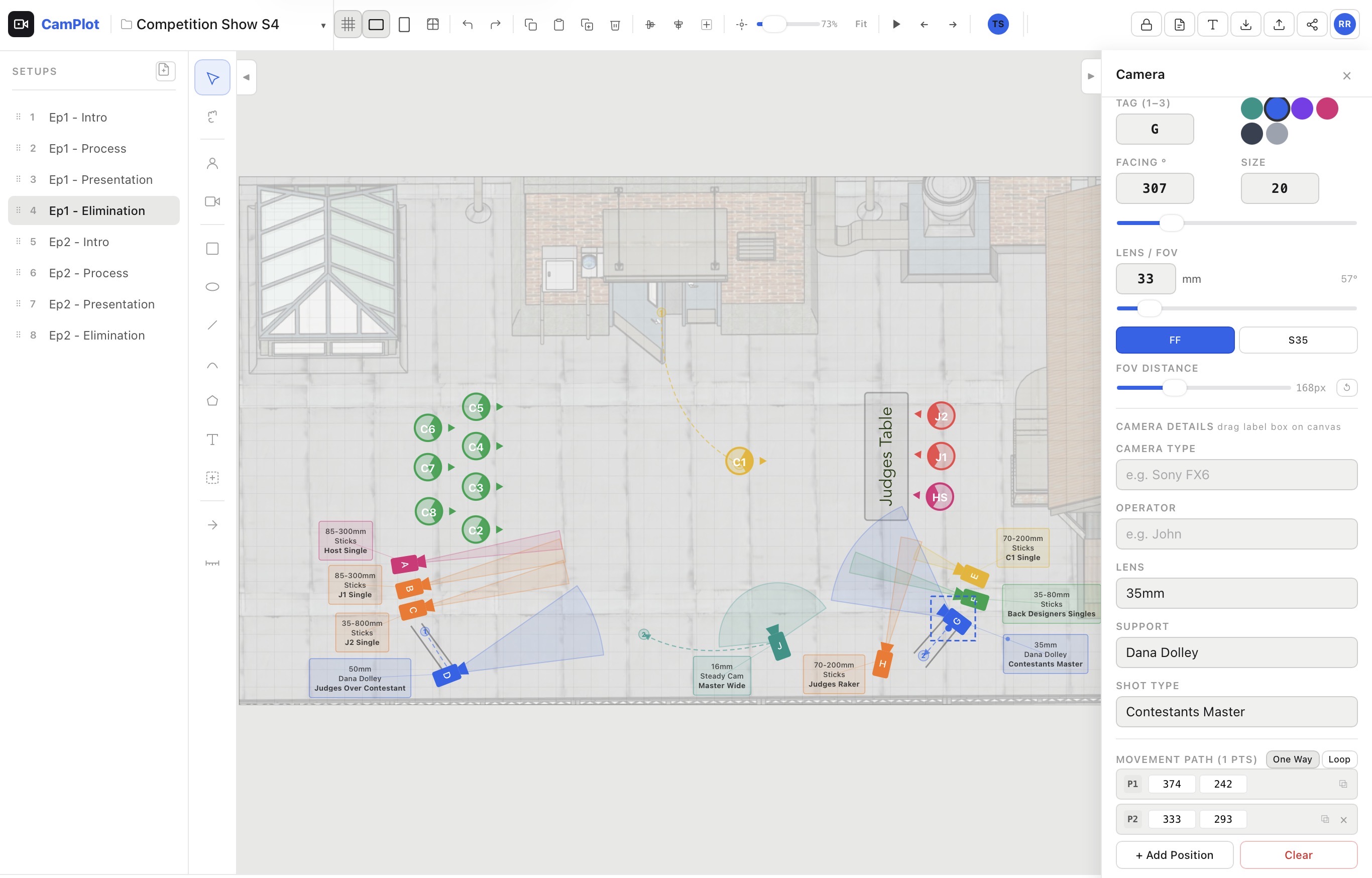
CamPlot in action — multicam overhead plot with cameras, subjects, FOV cones, and movement paths
Designed by a multi Emmy Award-winning, DGA multicam director with over two decades of experience — because no tool existed that was actually built for what directors do every day.
Everything You Need to Plot

Stop forcing PowerPoint and Keynote to do what they were never designed for.

Plotting

Build your overhead plot exactly the way directors think — cameras, subjects, fields of view, scaled measurements, and blocking.

Camera & Subject Plotting
Place cameras and subjects on your overhead plot with a single tap. Tag, color-code, and label each camera with type, operator, lens, support, and shot type.
Lens FOV Visualization
See exactly what each camera covers. Set focal length in mm, toggle between Full Frame and Super 35, and extend the FOV cone to visualize coverage at distance.
Camera Lock on Subject
Lock any camera's angle onto a subject with one tap. Move the camera or the subject anywhere on your plot — the camera's facing angle automatically tracks the subject. Shot details auto-fill as "initials + single" and stay editable.
Ground Plans Library
Import the ground plan from your art director or production designer and scale it to real-life dimensions. Choose from your library of ground plans when building a plot, then work over an accurate background that reflects the actual venue.
Scale & Measure
Set a scale reference and measure real distances on your plot in feet and inches. FOV distance readouts update automatically when a scale is set.
Movement Paths
Plot camera and subject movement with multi-point paths. Animate one-way moves or looping patterns. Hit play and watch your blocking come alive.
Shows Workflow

Built around how a multicam show actually runs — multiple setups per show, consistent rosters, and reports you can hand off.

Multi-Setup Shows
Organize your show with multiple setups — intros, eliminations, finales — all in one project. Drag to reorder. Hide setups that aren't ready to share.
Operator Roster
Assign operators and camera types to each camera letter once per show. Every camera you place auto-fills with the right operator and rig — across every setup.
Camera Report
Generate a complete camera report from your plot — camera tags, lenses, support, operators, and shot types — sorted and ready to print or share.
Sharing & Output

Get your plots in front of the crew and into your production materials without friction.

Crew Sharing
Share view-only links with your entire crew. Operators, ADs, and producers see the plot update in real time — no app download required.
Export & Print
Export any setup as PDF or JPEG — properly formatted for landscape or portrait. Export an entire show as a multi-page PDF. Cloud-saved and synced.
Cloud Save & Backup
Every change saves to the cloud automatically. Daily rolling backups keep 10 days of history — restore any version with a tap if anything goes wrong.
Install & Access

Install CamPlot on any device you work on — and keep plotting even when you lose signal.

Install on Any Device
Install CamPlot as a native app on iPad, iPhone, Android, Chrome, or Edge. Opens fullscreen, loads instantly, and keeps working offline — your changes sync the moment you're back online.
Works on Any Device
Built for iPad, laptop, and desktop. Touch-friendly with pinch-to-zoom, drag-to-pan, and tap-to-place. Your crew views plots on their phones.
"I spent years plotting cameras in Keynote — forcing a presentation tool to do something it was never built for. CamPlot does in minutes what used to take me hours."
— Multi Emmy Award-Winning DGA Multicam Director

Ready to Plot?

Join directors who've stopped wrestling with the wrong tools.

Free for 6 months. Cancel anytime.